 MoonGlide
Support
Answers to common questions about MoonGlide. If yours is not here, email us and a person on the team will reply.
It helps to include your iPhone model, iOS version and MoonGlide version (shown in the MoonGlide app).
Getting started
How do I join the beta?
Install TestFlight from the App Store, then open the MoonGlide beta link on your iPhone.
The beta has a limited number of spots. If it is full, email support@moonpyre.com and we will tell you when one opens.
How do I turn on MoonGlide?
- Open Settings on your iPhone.
- Go to General, then Keyboard, then Keyboards.
- Tap Add New Keyboard and choose MoonGlide.
- In any text field, hold the globe key and pick MoonGlide.
Do I need to turn on Full Access?
No. Typing, autocorrect, suggestions and learning all work without Full Access.
Full Access lets the MoonGlide app show your statistics, saved words and tip progress. Haptics work either way. MoonGlide never connects to the internet, with or without it.
Which languages are supported?
English, Slovak and Ukrainian, with QWERTY and QWERTZ layouts. You can have all of them active at the same time. More languages are planned.
Each language can use MoonGlide's own layout or its native one, for example Slovak with its extra accent keys. Change it in the MoonGlide app under Languages.
Why does MoonGlide include Russian?
For one personal reason: our founder's wife is Ukrainian and sometimes has to use Russian at work. Russian stays off unless you turn it on.
We stand firmly with Ukraine. Ukrainian typing, autocorrect and emoji search get the same care as English and Slovak.
Typing
How do I switch languages?
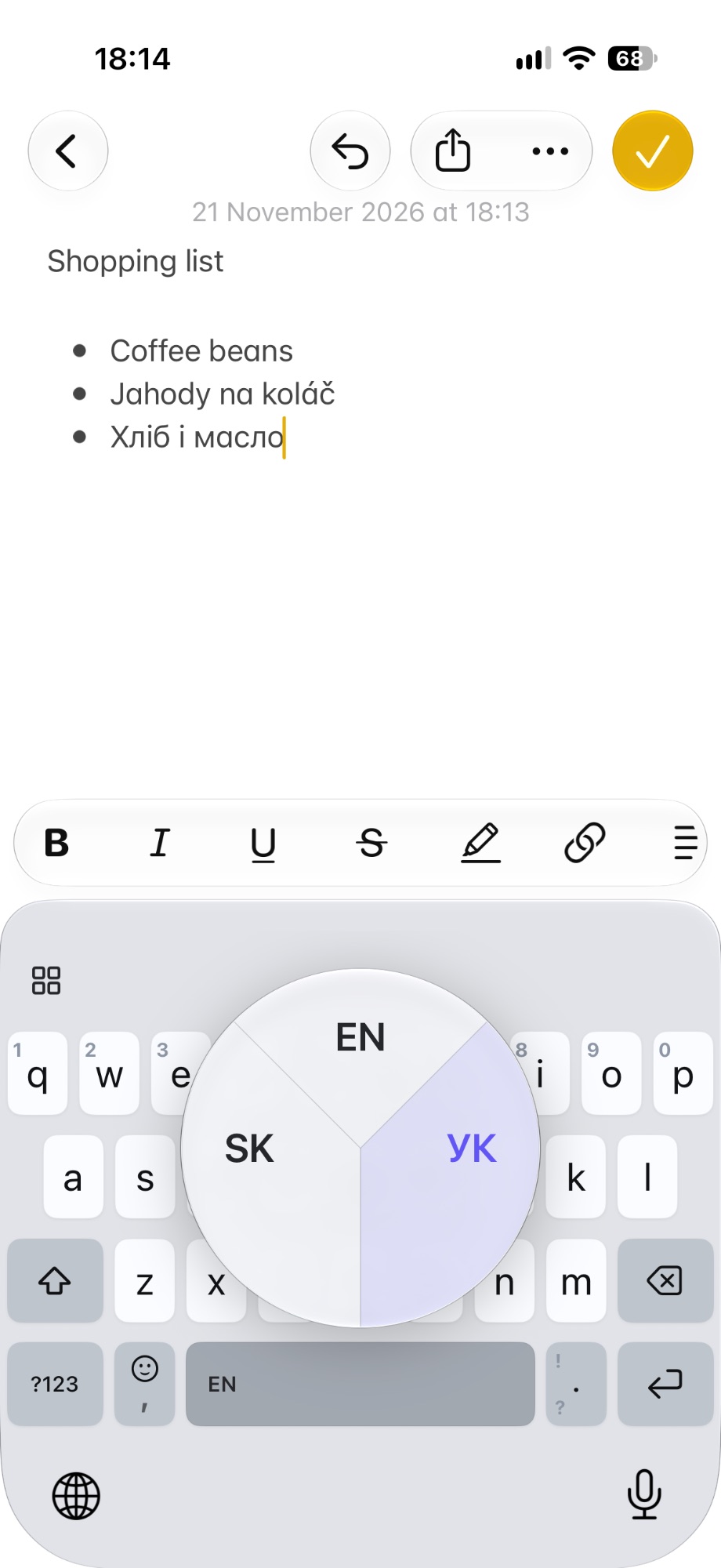
MoonGlide detects which language you are typing and corrects in it automatically, so for languages that share an alphabet you often do not need to switch at all.
To change the layout, flick the space bar. With three or more languages, swipe up on the space bar to open the language wheel.
Autocorrect changed a word I wanted to keep
Tap your original word in the suggestion bar to undo the correction. MoonGlide saves it to your personal dictionary and will not change it again. If you undo with the delete key instead, the word is saved the second time you do it.
How do I delete quickly or move the cursor?
Hold delete and slide left to remove whole words, or slide back to restore them. Slide along the space bar to move the cursor.
How do I hide the keyboard?
Swipe down from the suggestion bar above the keys.
Your data
How do I remove words MoonGlide has learned?
Open the MoonGlide app and go to Personal Dictionary. You can remove single words or all saved words. Learned names, emails and addresses can be cleared with Clear learned personal suggestions.
How do I reset my statistics?
Open the MoonGlide app, go to Statistics and tap Reset Statistics.
Does MoonGlide send what I type anywhere?
No. MoonGlide has no servers and does not connect to the internet. Everything it learns stays on your iPhone. See the privacy policy for details.
Troubleshooting
MoonGlide does not appear, or iOS switches back to another keyboard
iOS switches keyboards on its own in three cases. Password fields always use Apple's keyboard, for security. Each app remembers its own keyboard, so an app where you used another keyboard keeps it until you pick MoonGlide there once. And after a MoonGlide update, iOS switches every app back to Apple's keyboard.
To always get MoonGlide, remove the other keyboards in Settings, General, Keyboard, Keyboards (swipe left on each one). Password fields keep working as usual. If MoonGlide is missing from the list, remove it and add it again, or restart your iPhone.
Haptics feel stronger than expected
Haptics work with or without Full Access. Without it, iOS gives keyboards fewer haptic strengths, so the light setting feels a little firmer. For the full range, turn on Full Access in Settings, General, Keyboard, Keyboards, MoonGlide.
How do I send beta feedback?
Take a screenshot while using the beta and share it with TestFlight, or email us. Both reach the same small team.